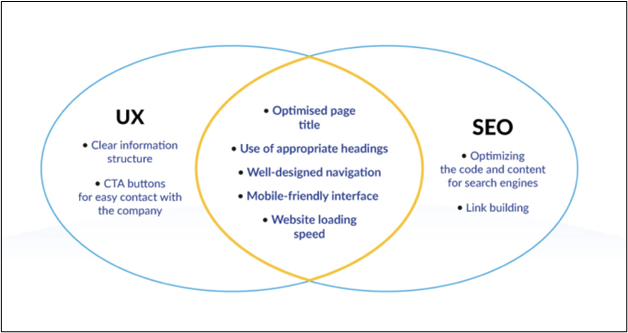

How to Optimize Your Website for SEO During the Design Phase
Creating a visually appealing website is not enough to attract visitors. In order to drive organic traffic to your site, you need to optimize it for search engines. This process starts during the design phase of your website. By incorporating SEO best practices from the beginning, you can set your site up for success right from the start.
1. Choose the Right Keywords
Before you even start designing your website, it’s important to conduct keyword research. Identify the keywords and phrases that your target audience is using to search for products or services similar to yours. By integrating these keywords into your website’s design, you can increase your chances of ranking higher in search engine results.
2. Create a Clear Site Structure
Having a clear and logical site structure not only improves the user experience, but also helps search engines navigate and index your website more effectively. Organize your content into categories and subcategories, and make sure each page can be easily accessed through clear navigation menus.
3. Optimize Your URLs
When designing your website, pay attention to your URLs. Make sure they are descriptive, concise, and include relevant keywords. This not only helps search engines understand the content of your page, but also makes it easier for users to remember and share your URLs.
4. Optimize Images and Videos
Images and videos are essential elements of a visually appealing website, but they can also impact your site’s SEO. When adding images and videos to your site, make sure to optimize them by adding relevant alt text, titles, and descriptions. This helps search engines understand the content of your media files and can improve your site’s rankings.
5. Mobile Optimization
With the increasing use of mobile devices, it’s essential to design your website with mobile optimization in mind. Make sure your site is responsive, meaning it adjusts to different screen sizes and resolutions. This not only improves the user experience, but also boosts your site’s SEO, as Google prioritizes mobile-friendly websites in search results.
6. Load Speed Optimization
Page speed is a crucial factor for both user experience and SEO. Slow-loading websites not only frustrate visitors, but also rank lower in search engine results. When designing your website, optimize images, minify code, and use caching techniques to improve your site’s load speed. This can have a significant impact on your site’s SEO performance.
7. Schema Markup
Schema markup is a type of microdata that helps search engines understand the content of your website better. By incorporating schema markup into your design, you can enhance your site’s visibility in search engine results and increase your chances of attracting more organic traffic. Consider using schema markup for your business address, phone number, reviews, and more.
8. Monitor and Analyze Performance
Once your website is live, it’s important to monitor and analyze its performance regularly. Use tools like Google Analytics to track key metrics such as organic traffic, bounce rate, and conversions. By monitoring your site’s performance, you can identify areas for improvement and continue to optimize your website for SEO.
By following these tips and incorporating SEO best practices during the design phase of your website, you can set your site up for success from the start. Remember, SEO is an ongoing process, so continue to monitor and optimize your site to ensure it ranks well in search engine results and attracts organic traffic.
Remember, a well-designed website is not just visually appealing, but also optimized for search engines. By following these tips, you can improve your site’s SEO performance and attract more organic traffic.